
Delta Executor Key
The Delta Executor Key is required to unlock the script execution features inside the Delta Mobile app. Without a valid key, you won’t be able to inject or run any Roblox scripts on your Android device.
This guide explains what the Delta Key is, why it’s important, and how to generate it step-by-step—even if you’re a beginner.
What Is the Delta Key and Why Is It Needed?
The Delta Key is a unique access code that activates the script panel inside Delta Executor.
It makes sure only real users can use the executor and helps keep the tool safe from abuse.
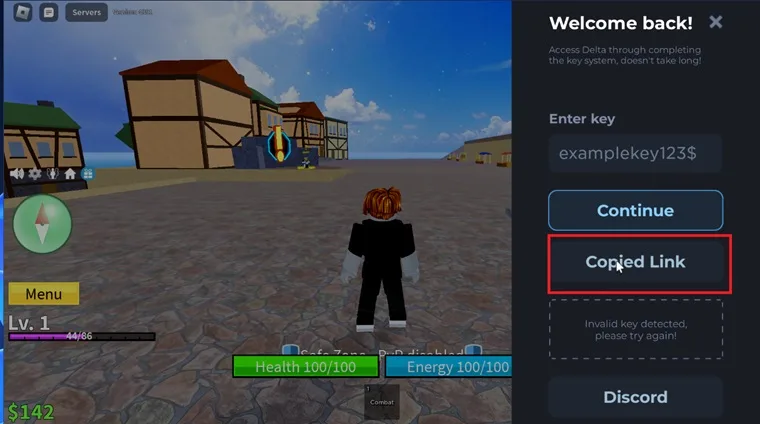
When you install and open Delta for the first time, the app will ask you for a key.
This key is generated from a special URL and is linked to your device for a limited time.
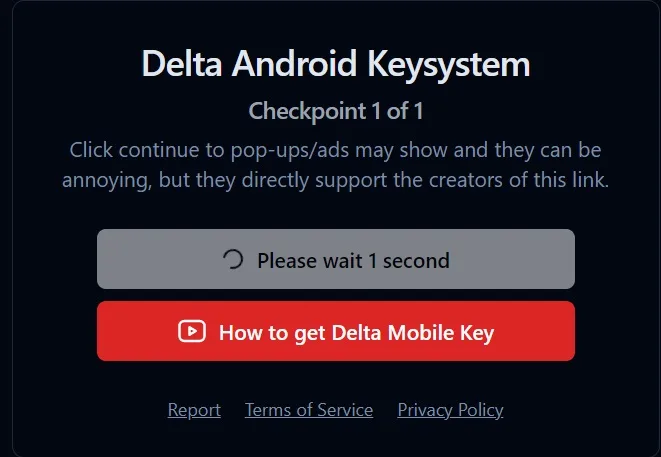
Before you get the key, you must complete a short verification process.
These redirects help support the developers and allow Delta to stay free for everyone.
If you don’t enter the correct key, the app will not inject scripts or open the script editor.
How to Get the Delta Executor Key (Step by Step)
You can generate the Delta Key directly from inside the app. Just follow these steps:
Step 1: Install and Open Delta Executor
- Download the latest version of Delta from the official website and install it on your Android device.
- Launch the app.
Step 2: Tap “Get Key”
- When the key screen appears, tap the “Get Key” button.
- This copies a unique URL to your clipboard.
Step 3: Paste the URL in Your Browser
- Open Chrome or your default browser, paste the copied link, and visit the page.
Step 4: Complete the Redirect Steps
- You will see a few redirect pages like “Continue” or “Go to Destination.”
- Stay on each page until it automatically redirects—don’t close tabs too early.
Step 5: Copy Your Generated Key
- After the redirects, the final page will show your Delta Key.
- Press and hold to copy it.
Step 6: Paste the Key Back in Delta
- Return to the Delta Executor app and paste the key into the key box.
Tap “Unlock” or “Send.” - If the key is correct, the app will unlock and show the script execution interface.
- You only need to do this again if the key expires or the app restarts.
Delta Key Not Working? Here Are Common Fixes
Most Delta key issues come from expired sessions, incomplete redirects, or copy mistakes. Here’s how to fix them:
1. “Invalid Key” Error
Cause: Key copied with extra spaces or mistyped.
Fix: Generate the key again and copy only the exact characters.
2. Key Page Not Loading
Cause: Browser ad blockers or pop-up blockers are blocking redirects.
Fix: Disable blockers temporarily or use a different browser like Chrome or Opera.
3. Sent Back to the Key Page Again
Cause: Session expired or incorrect key used.
Fix: Restart Delta and generate a fresh key.
4. “Get Key” Button Not Copying URL
Cause: App permissions blocked clipboard access.
Fix: Enable all permissions for Delta in your device settings.
5. Key Expires Too Quickly
Cause: Some keys expire after one use or app restart.
Fix: Simply repeat the “Get Key” process.
Tip: Always copy the key from the final destination page, not from browser history.
How Long Does a Delta Key Last?
Delta keys are temporary and only work for the current session. They can expire for several reasons:
- Delta is closed or force-stopped
- The app crashes
- The device restarts
- You stay inactive for too long
- A new update is released
There is no permanent Delta Key. You must generate a new one each time your session ends.
To avoid repeating the process, try not to close the app unless needed.
Conclusion
The Delta Executor Key is a simple but essential part of using Delta on Android.
Although the verification steps may take a moment, they help keep the executor free, updated, and secure.
By following the steps above, you’ll be able to generate your key easily, fix common errors, and keep Delta running smoothly on your device.
Always use trusted sources and avoid sharing your keys or downloading scripts from unknown websites.